Page 1 of 2
Preference property list bug in TextPad 5.4
Posted: Tue Oct 19, 2010 6:07 am
by martinm
The "improved" preference property lists in TextPad 5.4 are unusable when running on Windows XP with the desktop theme set to Windows Classic.
Instead of displaying checkboxes and radio buttons only grey bars are displayed.
Posted: Tue Oct 19, 2010 6:20 am
by MudGuard
I can confirm this - see
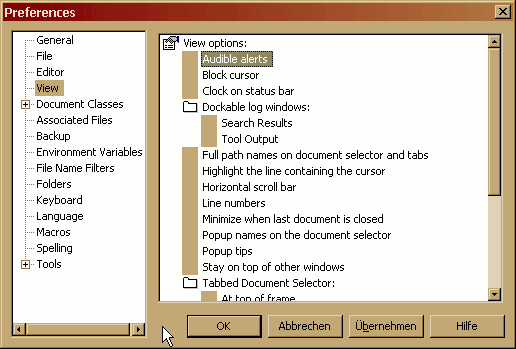
I am also running XP with classic theme.
Posted: Tue Oct 19, 2010 6:24 am
by MudGuard
same problem with Windows 7 and Classic view
Posted: Tue Oct 19, 2010 2:53 pm
by miked
I can confirm this problem too.
Also it is still easy to loose the find / replace dialogue boxes off the side off the desktop. (Which has annoyed me for years)
Posted: Wed Oct 20, 2010 6:09 am
by laila22
Same situation here,
Looking forward for some suggestions.
Thanks...
how to deal with depression
Posted: Wed Oct 20, 2010 10:15 am
by ACRobin
For information all fine on my copy of XP classic view and windows 7 64bit.
Posted: Wed Oct 20, 2010 10:28 am
by helios
Thanks for reporting the Preferences dialog bug. We will fix ASAP.
If miked or anyone else loses a dialog box outside of the normal range of the screen, you can recover it as follows:
1. Press the keyboard shortcut for the relevant dialog box.
2. Press Alt+Space to open the window menu.
3. Press M to select Move.
4. Use the up and left arrow keys to move the dialog back onto the screen.
5. Press Enter when it is in the desired location.
Posted: Wed Oct 20, 2010 1:43 pm
by DSPinFPGA
On w2k virtual machine, all settings classic (NT look and feel), 5.4 works as expected.
On xp32 host machine, all settings classic (NT look and feel), 5.4 exhibits the same problematic check boxes.
Hope this helps.
Posted: Fri Oct 29, 2010 1:04 am
by Lee Juses11
Thanks for the details guys,
Very advantage here in my part.
God Bless!
how to deal with depression
Posted: Thu Nov 18, 2010 3:42 pm
by bgclarke
Same issue with Textpad 5.4 on Vista Enterprise SP2 (32-bit) with Classic View. Works fine using Aero.
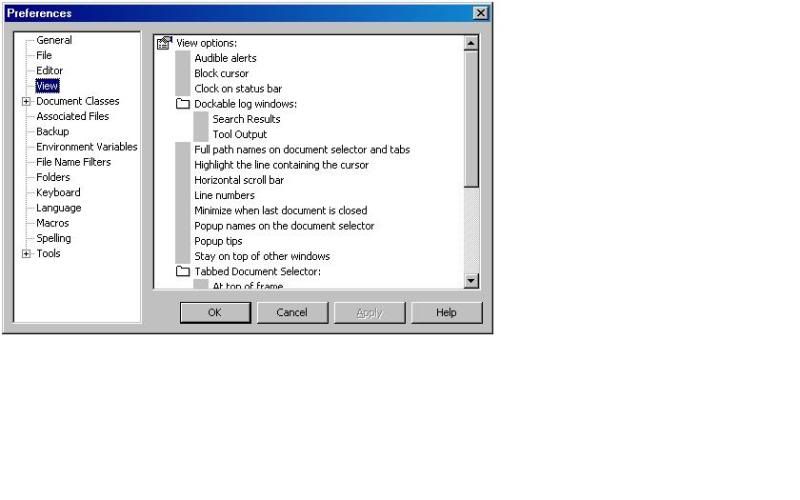
Preference property list bug in TextPad 5.4
Posted: Sat Nov 20, 2010 1:48 pm
by Ulf
The same problem with Windows XP SP3 (32-bit) and classic view!
I did find a workaround
Posted: Fri Nov 26, 2010 6:24 pm
by kengrubb
I'm running XP SP3.
Turn on Theme Service:
Right Click My Computer
Click Manage
Click Applications & Services
Click Services
Scroll down the right hand side until you see Theme Service
Then choose a Theme:
Right Click Desktop
Click Properties
Click Themes Tab
Choose a Theme
You may need to Browse to .theme files, which are perhaps located in C:\WINDOWS\Resources\Themes
Can't say that I'm enthused about Themes, but it works.
Posted: Wed Dec 01, 2010 9:18 am
by nvj1662
I just updated to TP 541 that solves the problem for me - XP3 "Classic".
Posted: Fri Dec 03, 2010 10:29 am
by Jiri
nvj1662 wrote:I just updated to TP 541 ...
and how to get TP 541?
Posted: Fri Dec 03, 2010 12:16 pm
by miked