Missing tab close buttons in Windows 10

General questions about using TextPad

Moderators: AmigoJack, bbadmin, helios, Bob Hansen, MudGuard

Post Reply
senpai71
Posts: 4
Joined: Thu Feb 16, 2006 8:13 pm

Missing tab close buttons in Windows 10

Post by senpai71 »

I'm using Textpad 7.6.4 (64-bit) on Windows 10, and it no longer displays the small close button in each tab - there's just a blank space to the right of the active tab's title.

When I hover the mouse over it, I can see a square, but there's no icon displayed...

It worked fine in Windows 7 (same version of TextPad).

I searched in these forums, but couldn't find anything matching my query... :(
User avatar
bbadmin
Site Admin
Posts: 1020
Joined: Mon Feb 17, 2003 8:54 pm
Contact:

Post by bbadmin »

Please try renaming the XML files (GUIState.xml and ConfigState.xml), one at a time,to see if that solves the problem. Exit from TextPad before renaming each file.

In windows 10 they are stored here:

C:\Users\[UserName]\AppData\Roaming\Helios\TextPad\version number.

A new XML file will be created when you start TextPad, but if the problem isn't resolved you can exit again, delete the new file and rename the original file in order to return to your previous configuration.

I hope this helps.
senpai71
Posts: 4
Joined: Thu Feb 16, 2006 8:13 pm

Post by senpai71 »

Hey @bbadmin, thanks for the quick response.

Unfortunately, I tried renaming them in turn each, but even with the newly-created file, the button has disappeared.

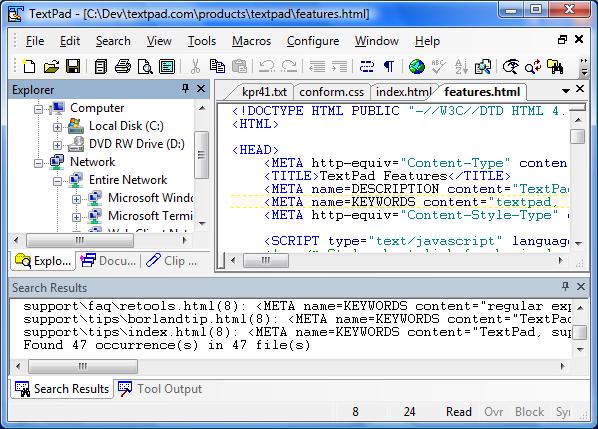
To clarify what I'm talking about, on this image (from https://www.textpad.com/products/textpa ... index.html)
Image

you can see the 'pin' and 'close' buttons in the top-right corner of the Explorer pane on the left-hand-side and in the top-right side of the main window, the 'active files' (down-arrow) and 'close' buttons. In my case (but not in this image), there is also a space for a button on the current active tab, to the right of the tab title text, which you can use to close that tab only.

In my case, those buttons are completely invisible. Only if I hover my mouse over them (well, over where I know they should be!), can I see the tooltip and a square outline, which I can click to get the action.
Post Reply