It's a bit of a simplification, but yes, UTF-8 is your best choice.
In the
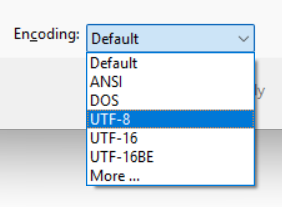
Save As dialogue, you can choose the encoding at the bottom of the window as you save a file:
- encoding.png (20.37 KiB) Viewed 3102 times
There is also a default for each file type in TextPad. Go to
Configure->Preferences... then choose
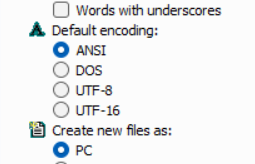
Document Classes. Under each file type, you'll see a section for
Default encoding:
- default-encoding.png (22.8 KiB) Viewed 3102 times
Changing this to
UTF-8 for
Text and
Default should be enough to avoid those warnings. If you like, you can change it for
C/C++ too, but there are reasons you might want to keep that ANSI.
It's not possible to "turn off" special characters. TextPad's policy is to try to convert them and warn you if it can't. UTF-8 is a great choice because it
should allow every character. ANSI is the default because while it's limited, it's also more compatible. Maybe I should say, historically, it's been more compatible. UTF-8 is pretty ubiquitous now.