Page 1 of 1
Capitalize - Ctrl+Shift+U not working V8.20
Posted: Fri Nov 08, 2024 5:42 pm
by MichaelG17
Capitalize - Ctrl+Shift+U is not working for me all of a sudden. I upgraded to version 8.20.0 but that didn't help.
I can use the drop down menu to Capitalize highlighted words, however, the key combo no longer works.
Any ideas?
Windows 11 Home
Version 23H2
Best regards,
Michael
Re: Capitalize - Ctrl+Shift+U not working V8.20
Posted: Fri Nov 08, 2024 8:48 pm
by miked
I use that often to format comments in source code, don't remember a problem when I was on V8, but I went to V9 ages ago so I'm probably no help.
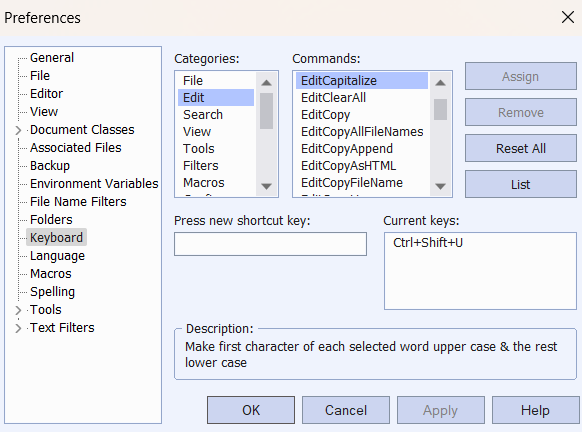
What do you see here? (in case it helps others to understand the issue)
- txtpadv9.6EC.png (35.99 KiB) Viewed 4074 times
Cheers,
Also a Michael.
Re: Capitalize - Ctrl+Shift+U not working V8.20
Posted: Fri Nov 08, 2024 9:23 pm
by MichaelG17
I get exactly the same as the pic you show.
Re: Capitalize - Ctrl+Shift+U not working V8.20
Posted: Fri Nov 08, 2024 9:32 pm
by MichaelG17
Thank you for the reply. BTW Ctrl+Shift+K works as advertised.
Re: Capitalize - Ctrl+Shift+U not working V8.20
Posted: Fri Nov 08, 2024 9:35 pm
by miked
Not sure what to advise. As you are W11 (like me) do you have anything that traps keyboard commands before TextPad sees it? I'm thinking Ctrl+Shift+U is something to do with a driver on your computer, graphics etc?
I was once caught out by a shortcut that turned the screen upside down.
Re: Capitalize - Ctrl+Shift+U not working V8.20
Posted: Fri Nov 08, 2024 11:20 pm
by AmigoJack
miked wrote: Fri Nov 08, 2024 9:35 pma driver on your computer
No, that's highly unlikely, if not impossible.
miked wrote: Fri Nov 08, 2024 9:35 pmI was once caught out by a shortcut that turned the screen upside down.
That was Ctrl+Shift+Arrows decades ago to rotate the screen to each side, and it was some graphics card background process, not its driver. At least not a "driver" in the technical/correct meaning - maybe "driver" in a whole setup/installation meaning (the bloated things sizing hundreds of megabyte).
In case of a global hotkey:
- You can use HotKeysList to find out if Ctrl+Shift+U is already registered, but sadly the program doesn't know who registered it.
- Super User: How do I find out which programs have registered global hotkeys in Windows 10? claims that Hotkey Detective works on Win10 (thus Win11, too) and must be run with Administrator privileges to show who registered that hotkey.
That would be the culprit, not TextPad.
Re: Capitalize - Ctrl+Shift+U not working V8.20
Posted: Sat Nov 09, 2024 5:24 pm
by MichaelG17
I tried using the Hotkeys programs but neither worked. So, I looked back to see what software was installed the past week or so.
I was trying to update an AMD graphics card driver. I couldn't find the driver and DownLoaded AMD Radeon™ Graphics and the AMD Software: Adrenalin Edition™ application.
I found it uses the Ctrl+Shift+U combo. I disabled it and voilà, it is working again in Textpad.
Thank you to those who offered help. It helped!!
Best,
Michael
Re: Capitalize - Ctrl+Shift+U not working V8.20
Posted: Sat Nov 09, 2024 8:46 pm
by miked
Excellent. We aim to please. Thank you for the feedback.
Mike.