Page 1 of 1
How to change the characters that words break/wrap on
Posted: Mon Nov 04, 2024 5:16 am
by fuzzy
Is there any way to change the set of characters that Textpad breaks/wraps words on? Some of them are really annoying, for example it'll break
on quotes, leaving an orphaned quote mark at the end of the line and the word being quoted on the next line. I haven't been able to find anything obvious in the config to control this.
Re: How to change the characters that words break/wrap on
Posted: Mon Nov 04, 2024 7:55 am
by AmigoJack
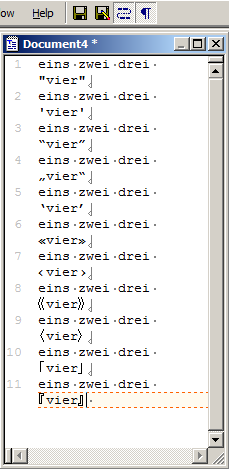
Cannot reproduce in TextPad 8.4.0 with all kinds of quotation marks. In this case there would be enough space to leave the first quotation mark on the same line and break the line with the fourth word into the next line - but TextPad just doesn't:
- TextPad quotes wrap.png (11.96 KiB) Viewed 7834 times
Please quote the exact text you're using and make sure you activate
View > Visible Spaces, so you make sure there are
no spaces between a quotation character and a word character. Then we may be able to at least reproduce your issue. So far TextPad breaks/wraps correctly only on
word boundaries.
No, this can't be configured anywhere.
Re: How to change the characters that words break/wrap on
Posted: Tue Nov 05, 2024 6:06 am
by MarJohn
AmigoJack wrote: Mon Nov 04, 2024 7:55 am
Cannot reproduce in TextPad 8.4.0 ...
Is there a TextPad 8.4.0? I thought the latest version of TextPad 8, released a few days ago, was 8.2.0.
Re: How to change the characters that words break/wrap on
Posted: Tue Nov 05, 2024 6:58 am
by AmigoJack
No, that's
TextPad 8.20.0 (minor version 20, while
minor version 4 was released 4,5 years ago). You cannot read version numbers like fractions:
.4 is lower than
.20 - those are still integers. Every number in a version is a number on its own, never a fraction - trailing zeroes have a value.
Re: How to change the characters that words break/wrap on
Posted: Tue Nov 05, 2024 10:21 am
by MarJohn
Ah, good explanation; thanks.
Re: How to change the characters that words break/wrap on
Posted: Wed Nov 06, 2024 12:49 pm
by fuzzy
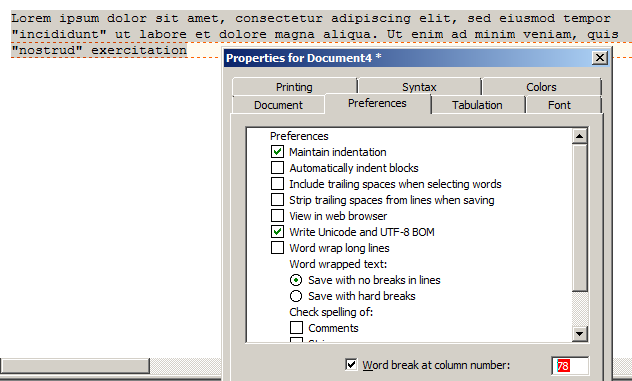
Here you go, word wrap set to 78 characters, text before reformatting:
Lorem ipsum dolor sit amet, consectetur adipiscing elit, sed eiusmod tempor
"incididunt" ut labore et dolore magna aliqua. Ut enim ad minim veniam, quis
"nostrud" exercitation
Same text after reformatting with Shift + Ctrl + J:
Lorem ipsum dolor sit amet, consectetur adipiscing elit, sed eiusmod tempor "
incididunt" ut labore et dolore magna aliqua. Ut enim ad minim veniam, quis "
nostrud" exercitation
This is for Textpad 9.5.1.
Re: How to change the characters that words break/wrap on
Posted: Wed Nov 06, 2024 2:28 pm
by AmigoJack
No, still can't reproduce: I copied your text, inserted it, selected all the lines, did Ctrl+Shift+J (Edit > Reformat) and it didn't leave any quotation mark alone. Maybe it's really a bug being introduced with TextPad 9...?
- TextPad word break column 78.png (29.85 KiB) Viewed 7785 times
Re: How to change the characters that words break/wrap on
Posted: Wed Nov 06, 2024 4:08 pm
by bbadmin
I'm unable to reproduce this with TextPad 9.6.0. Does your document class specify the double quote character as something special?
TextPad 8 & 9 implement the line breaking algorithm specified in the Unicode Standard Annex #14 and there is no way to customize its behavior.
Re: How to change the characters that words break/wrap on
Posted: Thu Nov 07, 2024 8:04 am
by miked
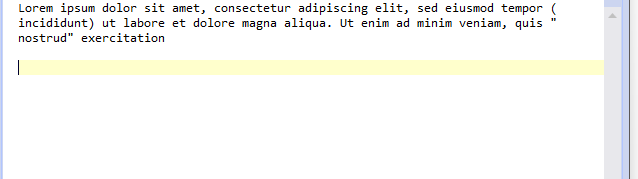
I can reproduce this in V9.6.0
Tried using different quote symbols, brackets etc.
Also happens without setting a word break column number. Simply turning word wrap on and making the window smaller.
- txtpadv9.6WR.png (7.39 KiB) Viewed 7769 times
Re: How to change the characters that words break/wrap on
Posted: Thu Nov 07, 2024 3:53 pm
by bbadmin
This occurs when syntax highlighting is enabled in the Text document class with text.syn as the definition file. It will be fixed in the next release.
Re: How to change the characters that words break/wrap on
Posted: Fri Nov 08, 2024 5:20 am
by fuzzy
Just checked and that's the case here, I hadn't touched that setting ("it was like that when I got here"). Is it safe to turn off syntax highlighting in this case? Looking at text.syn it doesn't seem to do much.
Re: How to change the characters that words break/wrap on
Posted: Fri Nov 08, 2024 8:12 am
by bbadmin
Yes, you can turn off syntax highlighting for the Text document class. Its only purpose is to highlight URLs.
Re: How to change the characters that words break/wrap on
Posted: Tue Nov 12, 2024 2:10 pm
by bbadmin
This is fixed in 9.6.1 and 8.20.1 which can be downloaded now.