Page 1 of 1
TextPad 8.1.2 Uninstall Errors
Posted: Tue Aug 13, 2024 11:41 am
by MarJohn
Trying to uninstall TextPad 8.12 on a Windows 10 computer, I get the following error messages, then the uninstall ends (without doing anything):
-
TextPad 8.12
Error 2503. Called Run Script when not marked in progress.
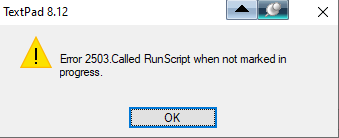
- 2024-08-13 21_25_59-TextPad 8.12.png (6.19 KiB) Viewed 8649 times
-
TextPad 8.12
Error 2502. Called InstallFinalize when no install in progress.
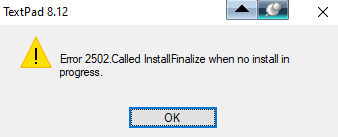
- 2024-08-13 21_26_36-TextPad 8.12.png (6 KiB) Viewed 8649 times
Any help on what I can try to overcome these two messages, and successfully uninstall TextPad will be most welcome.
Re: TextPad 8.1.2 Uninstall Errors
Posted: Tue Aug 13, 2024 2:55 pm
by bbadmin
Re: TextPad 8.1.2 Uninstall Errors
Posted: Tue Aug 13, 2024 8:15 pm
by AmigoJack
This issue occurs if the system date is incorrect.
I've encountered computers where the
time was set
relatively wrong, as in: it had the wrong time zone chosen just to fit the current daylight saving (or vice versa) instead of choosing the correct time zone and tick the "
adjust for daylight saving time automatically" checkbox. As per your screenshot filenames they were created at a time
8 hours ahead - are you sitting in Hong Kong or Australia?
A different reason for willfully having an incorrect system date is tricking expired software licenses into being valid again.
Re: TextPad 8.1.2 Uninstall Errors
Posted: Wed Aug 14, 2024 1:25 am
by MarJohn
Yes, it seems to have done the trick; partially, at least. Thank you.
It appears to be the problem is in permissions on the "C:\Windows\Temp" folder.
Changed permissions for "users" to full permissions and the uninstall progressed, but there was also a problem with Explorer.
I overcame that by stopping it running, then restarting it with "Create this task with administrative privileges" selected.
Re: TextPad 8.1.2 Uninstall Errors
Posted: Wed Aug 14, 2024 1:30 am
by MarJohn
AmigoJack wrote: Tue Aug 13, 2024 8:15 pm
This issue occurs if the system date is incorrect.
I've encountered computers where the
time was set
relatively wrong, as in: it had the wrong time zone chosen just to fit the current daylight saving (or vice versa) instead of choosing the correct time zone and tick the "
adjust for daylight saving time automatically" checkbox. As per your screenshot filenames they were created at a time
8 hours ahead - are you sitting in Hong Kong or Australia?
A different reason for willfully having an incorrect system date is tricking expired software licenses into being valid again.
Good catch - very observant. Yes, the screenshot filenames are at a time 8 hours ahead (of you, presumably) because I was sitting at my computer in Australia.
And no, I don't set the system date incorrectly!
Re: TextPad 8.1.2 Uninstall Errors
Posted: Wed Aug 14, 2024 10:07 am
by bbadmin
MarJohn wrote: Wed Aug 14, 2024 1:25 am
Yes, it seems to have done the trick; partially, at least. Thank you.
That's good to know.
Please note that the uninstaller doesn't delete anything created after the installer has finished, so you'll still have files in these folders:
Code: Select all
C:\ProgramData\Helios
%APPDATA%\Helios
Also, it will not remove any file associations you may have made.
Re: TextPad 8.1.2 Uninstall Errors
Posted: Wed Aug 14, 2024 12:06 pm
by MarJohn
Thanks for pointing those things out - handy to note, and to be aware of.
BTW, I've successfully installed version 9.5.1 so there is obviously files in the folders that you mentioned.
Well, in C:\Users\xxxx\AppData\Roaming\Helios\TextPad\9 is all the most up to date files.
C:\Users\xxxx\AppData\Roaming\Helios\TextPad\8 contains the old files, so I guess that can safely be deleted now.
Re: TextPad 8.1.2 Uninstall Errors
Posted: Wed Aug 14, 2024 1:59 pm
by bbadmin
The first time TextPad runs it copies any configuration files it finds from a previous release, so you can delete folder "8".
Re: TextPad 8.1.2 Uninstall Errors
Posted: Thu Aug 15, 2024 1:46 am
by MarJohn
bbadmin wrote: Wed Aug 14, 2024 1:59 pm
The first time TextPad runs it copies any configuration files it finds from a previous release, so you can delete folder "8".
Thanks for confirming that - it's given me the confidence to go ahead and do it.