Page 1 of 1
Bug (v8.19.0) Display issue: Docked windows on the left side of the main window
Posted: Mon Jun 10, 2024 8:19 pm
by martinm
In version 8.19.0, there is a display issue with the Clip Library, Explorer and Document Selector, which are docked to the left side of the main window. See the attached screenshot with the incorrect display:
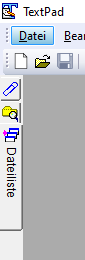
- NOK.PNG (5 KiB) Viewed 7849 times
Re: Bug (v8.19.0) Display issue: Docked windows on the left side of the main window
Posted: Tue Jun 11, 2024 8:13 am
by AmigoJack
I guess you miss the captions for 2 tabs, while only the caption for 1 is displayed. In that case: does it also happen using English as language? Mayby Deutsch misses a few translations...
Re: Bug (v8.19.0) Display issue: Docked windows on the left side of the main window
Posted: Tue Jun 11, 2024 12:08 pm
by bbadmin
I don't know how to get TextPad into that state, but to restore the defaults, exit from it and delete this file:
C:\Users\USERNAME\AppData\Roaming\Helios\TextPad\8\GUIState.xml
It will be recreated next time you run TextPad.
Re: Bug (v8.19.0) Display issue: Docked windows on the left side of the main window
Posted: Wed Jun 12, 2024 4:35 am
by martinm
This also happens when using the English language. The translation for the tabs is present in the German translation. When you click on the other two tabs, the text will be displayed on the corresponding tab.
I installed the English version of TextPad in a VHD-based second Windows 10 installation on the same machine after previously uninstalling the German version. Before starting the English version of TextPad, I deleted the entire AppData\Roaming\Helios\TextPad\8 folder with the old configuration files.
You can see the result in this screenshot:
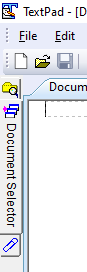
- 01_SCNOKENG.PNG (5.51 KiB) Viewed 7822 times
If I select View > Appearance and change it to Default and then back to Light, it looks like this:

- 02_SCOKENG.PNG (6.69 KiB) Viewed 7822 times
This is the "normal" tab layout that was also present in the previous 8.x versions. However, when I close and restart TextPad, I am back to the 01_SCNOKENG.PNG layout.
Re: Bug (v8.19.0) Display issue: Docked windows on the left side of the main window
Posted: Wed Jun 12, 2024 4:41 am
by martinm
On my main desktop I had two GUIState files: GUIState.xml and GUIState-0700.xml. I closed TextPad, deleted both files and restarted TextPad. Now only GUIState-0700.xml was recreated. The three following screenshots show the result.
Layout after starting TextPad without an existing GUIstate file:

- 03_SCNEW.PNG (16.47 KiB) Viewed 7821 times
Layout after selecting View -> Appearance and changing first to Default and then back to Light;
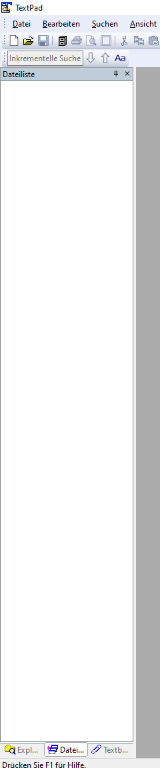
- 04_SCVIEW1.PNG (16.42 KiB) Viewed 7821 times

- 04_SCVIEW2.PNG (6.42 KiB) Viewed 7821 times
However, when I close and restart TextPad, I am back to the "wrong" layout shown in the previous posts.
I have now seen this reproducible misbehavior on my Windows 10 desktop, on a Windows Server 2022 Standard, and on the VHD-based Windows 10 installation mentioned in the previous post.
Re: Bug (v8.19.0) Display issue: Docked windows on the left side of the main window
Posted: Wed Jun 12, 2024 4:49 pm
by bbadmin
Thanks for explaining how to reproduce this. It should make it easier to fix!