Page 1 of 1
find/replace space to hyphen at specific column location?
Posted: Sun May 26, 2024 2:51 pm
by ckhalleran
I've never used regular expressions in Textpad, but this might work for me? I hope to check a few column locations on each line (27, 30, 33, 36, 39 and 42). If there's a space at that location, I want to change it to a hyphen/dash. And I want to do it to the end of the file.
Here's a screen image from the report that I am starting with. So if there's not an asterisk at that position (if it's a space) I want to change it to a hyphen.
Thanks,
Chris
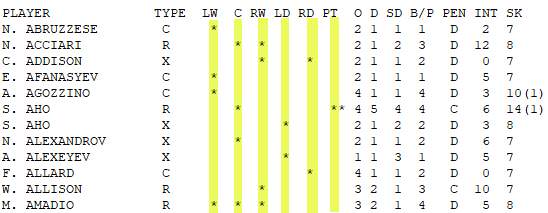
- screenimage.jpg (20.77 KiB) Viewed 7455 times
Re: find/replace space to hyphen at specific column location?
Posted: Sun May 26, 2024 4:32 pm
by AmigoJack
You have to search for each column separately:
- Find: (Note the trailing space after the closing curly bracket.)
Explanation:
- ^ = start of line
- () = capture what's in between the parenthesis
- . = any character
- {26} = repeat previous match (that is "any character") 26 times
- (space) = find literally a space
- Replace with: The "\1" part re-inserts the same 26 characters. And then the minus.
- Button "Replace all"
For each column, use either 26, 29, 32, 35, 38 and 41 as "repeat previous match". It's one less than the column of interest because the position of the column is already the one where you want to only match the space.
Regular expression work in TextPad the same way as elsewhere. You can learn everything about it reading
https://www.regular-expressions.info/ and experiment on everything with
https://regex101.com/.
Re: find/replace space to hyphen at specific column location?
Posted: Mon May 27, 2024 7:51 am
by bbadmin
That will replace everything that's matched (i.e. all characters up to the space) with "-". Everything but the space needs to be saved in a register so it can be inserted in the replacement expression.
Code: Select all
Find what: ^(.{26})\s
Replace with: $1-
Note that \s matches tabs and spaces, but I used it to make the space visible here.
Re: find/replace space to hyphen at specific column location?
Posted: Mon May 27, 2024 8:04 am
by AmigoJack
Oh yes - I totally forgot that. Corrected my post.
Your "\s" however could match more than only a space - the literal space would fit more IMO because then it wouldn't match unexpected "spaces" (like linebreaks or non-ASCII spaces). Or this is actually wanted...