Page 1 of 1
Old search strings can no longer be deleted in dialogue boxes
Posted: Tue Feb 06, 2024 3:29 pm
by tosch
This applies to items Find, Find in Files and Replace under the Search menu. I am using Textpad vs 9.3.1 on Win11.
In Textpad 8 I could delete old search strings from the dropdown (the search string itself, the file filter and the folder scope) after right-clicking on an item. I cannot see that very useful options anymore. Is it gone, has it been moved, is it a genearal malfunction or something just not working on my system?
I know that those strings can be edited in ConfigState.xml (%appdata%\helios\textpad\9\), but that is tedious in comparison.
Re: Old search strings can no longer be deleted in dialogue boxes
Posted: Tue Feb 06, 2024 4:32 pm
by bbadmin
Have a look at the Manage History Lists command on the Configure menu.
Re: Old search strings can no longer be deleted in dialogue boxes
Posted: Wed Feb 07, 2024 3:26 pm
by tosch
Thanks for the reply. Unfortunatly, Textpad crashes on me each time I try to access 'Manage history lists ...'. I contacted
support@textpad.com about this yesterday. I am waiting for their reply. I was unaware though that 'Manage history lists' is about remembered search strings. I am a Textpad new to version 9 and clicked it out of couriosity.
Re: Old search strings can no longer be deleted in dialogue boxes
Posted: Thu Feb 08, 2024 8:29 pm
by bbadmin
Go to Configure › Preferences › File and make sure "Number of recent files of File menu" is not 0. This will be fixed in the next release.
Re: Old search strings can no longer be deleted in dialogue boxes
Posted: Fri Feb 09, 2024 10:53 am
by tosch
Thanks for your reply. I temporarily changed the file and workspace MRU to 1, and indeed TP9 no longer crashed on clicking 'Manage history lists'. But the only list I could see there was the file MRU, which I do not want in the first place. There was no history list of string items used in Find, Replace or Find. Enabling file and tws MRUs is not an option anyway. Indeed, if I had a system-wide option 'To hell with all MRUs' I would use it.
I upgraded Textpad from vs 9.3.1 to 9.4.0. That made no difference.
For now it seems I am left with no alternative to editing the ConfigState.xml per script. With the obvious disadvantage of a not-officially supported method, it may stop working with any future update if that comprises changes to the XML structure.
Re: Old search strings can no longer be deleted in dialogue boxes
Posted: Fri Feb 09, 2024 5:57 pm
by bbadmin
Click on the down arrow at the right of "Recently used files" and select the one you want from the drop-down list.
Re: Old search strings can no longer be deleted in dialogue boxes
Posted: Tue Feb 13, 2024 11:50 am
by tosch
Hi bbadmin, and thanks for your effort. But as I said, I dislike MRUs in general and have therefore reverted to 'Number of recent * on file menu' = 0 (in Prefs / File). That also restored the crashing behaviour when clicking on 'Manage history lists', even though I upgraded to vs 9.4.0. It doesn't bother me.
I can also live with cleaning the search / replace string MRUs in ConfigState.xml per script.
I think we should close this thread, as I seem to be the only one interested, and to me it is not so important. The feature in vs 8 that allowed removing items from the drop-down after right-click was neat. There was probably a reason for not porting it to vs 9. Perhaps it will be brought back at some point.
Re: Old search strings can no longer be deleted in dialogue boxes
Posted: Wed Apr 17, 2024 2:22 pm
by johndee
You are not alone with this topic of not being able to remove previously searched strings/text.
I want to do this also.
I am interested in "I can also live with cleaning the search / replace string MRUs in ConfigState.xml per script".
How is this done -- can you please define the steps to effect this operation?
I am not familiar with ConfigState.xml -- what is it and how can I expunge the search-items?
Thanks.
Re: Old search strings can no longer be deleted in dialogue boxes
Posted: Thu Apr 18, 2024 7:35 am
by bbadmin
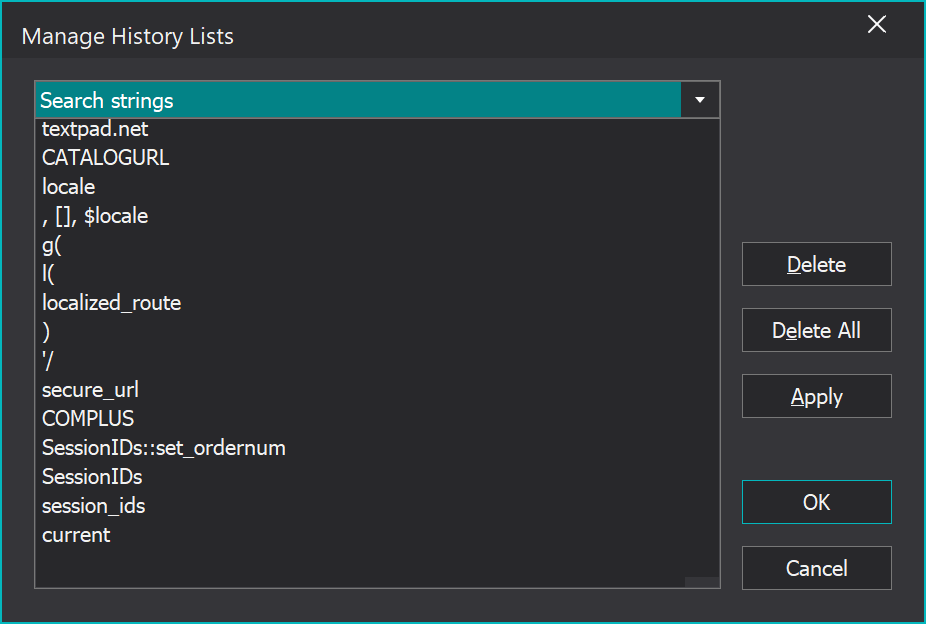
If you select "Manage History Lists" on the configure menu, this dialog box will be displayed:
- HistoryLists.png (34.7 KiB) Viewed 15374 times
Choose the one you want to manage from the drop-down, then select and delete the entries you don't want to keep.
Note that the bug which caused it to crash when the number of recently used files was set to zero was fixed in TextPad 9.4.1 and 8.18.1.
Re: Old search strings can no longer be deleted in dialogue boxes
Posted: Fri Apr 19, 2024 4:06 am
by MarJohn
I'm still on TextPad version 9.0.1 64-bit, and I can't find any sign of the "Manage History Lists" on the Configure Menu (or anywhere else, for that matter).
Could you please point me in the right direction.
Re: Old search strings can no longer be deleted in dialogue boxes
Posted: Fri Apr 19, 2024 7:35 am
by ben_josephs
History lists were added in versions 9.1.0 and 8.16.0 (in February 2023).
Re: Old search strings can no longer be deleted in dialogue boxes
Posted: Sat Apr 20, 2024 8:35 am
by MarJohn
Thanks; I wasn't aware of that.
