Page 1 of 1
Column number below scroll bar in 9.x
Posted: Thu Jul 20, 2023 10:36 pm
by sandbote
One of the things that I notice after upgrading to 9.x is that the very bottom-most bar no longer displays the column I am typing at. This was a pretty useful feature. For example: I want to create a horizontal bar of characters in my document to separate two sections, and the bar must be exactly 78 characters...
Is this a bug? Or is this a feature that I need to re-enable in some new way?
Re: Column number below scroll bar in 9.x
Posted: Thu Jul 20, 2023 11:20 pm
by AmigoJack
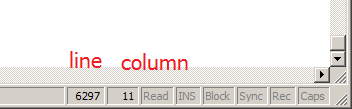
Trivia: that's a control and its name is
status bar. It can be identified by usually having a size grip on the right side to have a larger area for starting to resize a window (than only the window border). You should know it from many other programs.
- 20230721 TextPad statusbar.png (4.26 KiB) Viewed 24327 times
Re: Column number below scroll bar in 9.x
Posted: Fri Jul 21, 2023 8:27 am
by bbadmin
Is the status bar visible? Check View » Status Bar.
Re: Column number below scroll bar in 9.x
Posted: Sun Aug 06, 2023 1:37 am
by sandbote
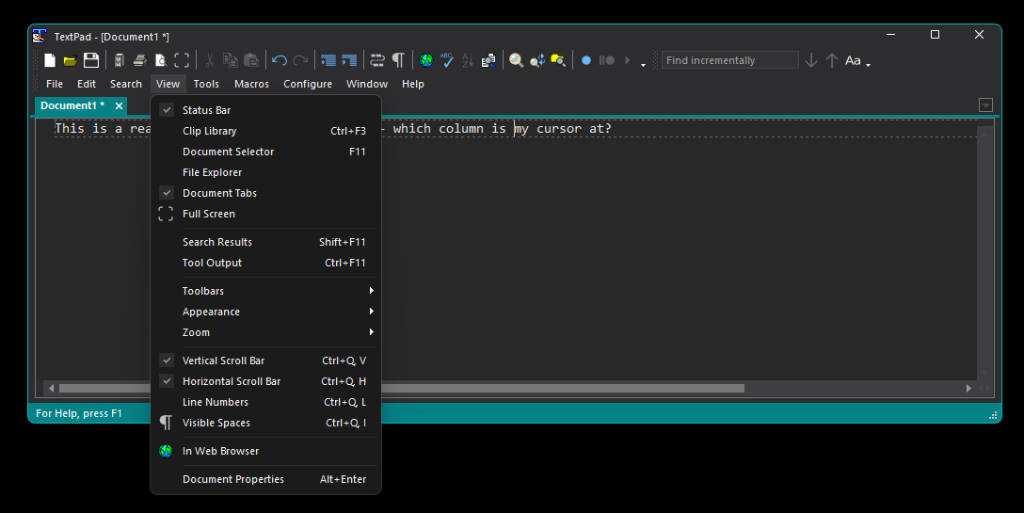
This is all that I see after the 9.2.3 upgrade. The status bar is definitely enabled. But the only informative thing that the status bar tells me is that X bytes are selected whenever I make a selection. The column number feature is sorely missed...
- Version 9 Bottom Bar.png (89.39 KiB) Viewed 24269 times
Re: Column number below scroll bar in 9.x
Posted: Sun Aug 06, 2023 5:50 pm
by bbadmin
This is what it should look like:

- statbar.png (18.46 KiB) Viewed 24259 times
Try deleting or renaming the following file, after exiting from TextPad:
%APPDATA%\Helios\TextPad\9\GUIConfig.xml
It will be recreated when TextPad next exits.
Re: Column number below scroll bar in 9.x
Posted: Wed Aug 09, 2023 5:29 pm
by sandbote
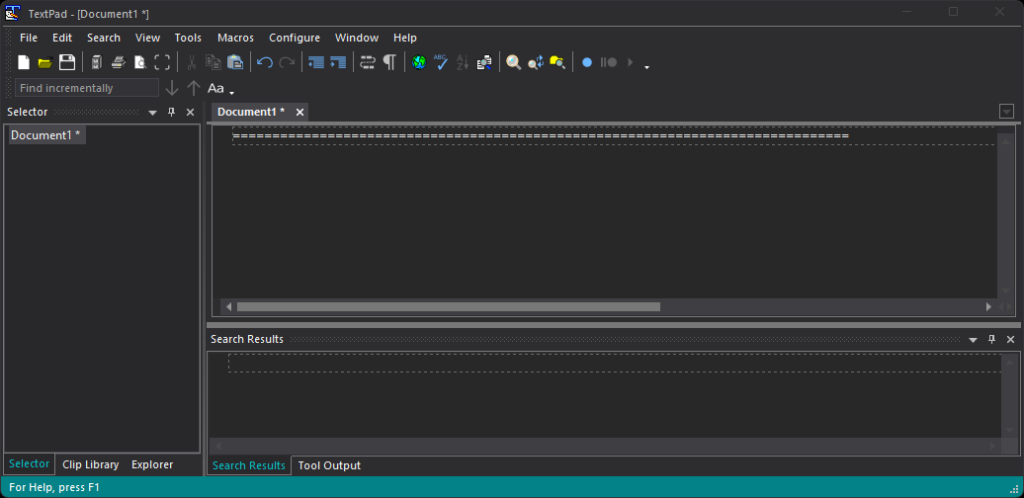
What I notice after deleting GUIConfig.xml is that there is no longer a system bell sound when TextPad starts up. I suppose that's an improvement

However, the status bar display is still not what either of us are expecting. This is Windows 11 Pro version 22H2, DirectX 12 if any of that matters.
Is there a debugging log file that I can send to you?
- AfterGUIxmlDelete.png (73.45 KiB) Viewed 24219 times
Re: Column number below scroll bar in 9.x
Posted: Wed Aug 09, 2023 10:15 pm
by AmigoJack
Could the statusbar's first panel be too long, effectively moving all others out of the window's width?
Does this look like this with every View > Appearance?
Re: Column number below scroll bar in 9.x
Posted: Thu Aug 10, 2023 8:19 am
by bbadmin
What's your display resolution and scaling? (Start/Settings/System/Display)
Can you display the clock on the status bar? (Configure/Preferences/View)
If you press the Caps key, is "Caps" displayed?
If you press the Ins key is "Ovr" displayed?
Incidentally, it was worth asking the question, but the first panel is what's left after assigning space for all the other ones.
Re: Column number below scroll bar in 9.x
Posted: Thu Sep 07, 2023 6:05 am
by sandbote
Hello again,
Sorry for the late response. Just tonight I have upgraded to version 9.3, and I still see the same issue. To answer some of your earlier questions:
- My display is 5120x1440 (super-ultrawide monitor)
- I have enabled the clock, and it does not show up in the status bar.
- The 'CAPS' indication (I remember this from 8.x) also does not show up in the status bar.
- When I switch into insert mode, the indication does not show up in the status bar.
The one thing that does seem to show up is the message "[xxx] bytes selected" after making a selection.
Re: Column number below scroll bar in 9.x
Posted: Thu Sep 07, 2023 7:34 am
by miked
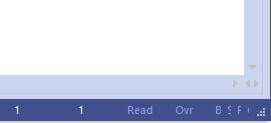
I don't know if it is relevant, but I have found that after enabling the clock on the status bar, and then disabling it, reducing the width of the window hides the status bar panels on the right. As if it sets a minimum width for the first (left most panel) equal to it's current width.

- Screenshot 2023-09-07 082819.jpg (4.02 KiB) Viewed 24136 times
And then following that if I enable and then disable the clock again it messes up the widths of the text in the right status panels.
- Screenshot 2023-09-07 083025.jpg (2.53 KiB) Viewed 24136 times
All goes back to normal after restarting textpad though.
This is with V9.3.0
Re: Column number below scroll bar in 9.x
Posted: Thu Sep 07, 2023 3:26 pm
by bbadmin
The left hand end of the status bar which is used for displaying messages is stretchable, but has a minimum width which is a quarter of the width of the primary screen. If TextPad is on a second screen with lower resolution, this may make it too long to leave room for the fixed indicators, so they are clipped. The same issue could arise if TextPad is on the primary screen in a small window.
Re: Column number below scroll bar in 9.x
Posted: Sun Sep 17, 2023 12:01 pm
by bbadmin
This is fixed in 9.3.1.
Re: Column number below scroll bar in 9.x
Posted: Mon Sep 18, 2023 8:17 am
by miked
I have just tried (using 9.3.1) enabling and then disabling "Show clock on status bar" and there is still a problem after that when making the window smaller.
Re: Column number below scroll bar in 9.x
Posted: Mon Sep 18, 2023 10:21 am
by bbadmin
It resolves itself after restarting TextPad. Hopefully, you won't need to show and hide the clock very often! Thanks for reporting it.
Re: Column number below scroll bar in 9.x
Posted: Tue Sep 19, 2023 8:29 pm
by sandbote
Can confirm it's working once again for me after the 9.3.1 update. Thanks for the fix!