Page 1 of 1
Search Results highlighting is invisible
Posted: Wed Jun 28, 2023 8:43 am
by 30fold
When I search for text TextPad highlights the result using a very light grey that is nearly invisible. Is there any way to change that specific default color? I am able to change the colors of highlighted text, current line, etc. but those all assume you know where this text is, click on it, and highlight it. What I need is to be able to see the text TextPad has found. Currently, to me, it is invisible and undetectable.
Re: Search Results highlighting is invisible
Posted: Wed Jun 28, 2023 10:08 pm
by AmigoJack
30fold wrote: Wed Jun 28, 2023 8:43 amTextPad highlights the result using a very light grey
You mean you open the
Search > Find dialog, click its
Find next button and leave the dialog window open? And are talking about the background color?
You can change that in
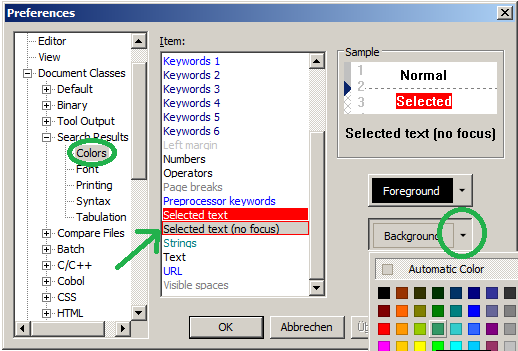
Configure > Preferences > Document Classes > [for each you want] > Colors > Item > Selected text (no focus) for both colors: foreground=text and background. The screenshot is an example for the search results document (sorry, most likely this is the least Document Class you need):
- 20230629 TextPad search match colors.png (29.5 KiB) Viewed 14044 times
Alternatively close the
Find dialog window and just hit
Ctrl+F again and again - then the colors of
Selected text from said preferences are used, which should have more contrast.
Re: Search Results highlighting is invisible
Posted: Thu Jun 29, 2023 3:14 am
by 30fold
Thanks sincerely. Sadly, those colors only take effect after you go to the --found text-- and click on it. By that time, your eyes have seen it. It's then considered a focused selection. When it's just --found-- by the search feature, it's just black text on a super light grey almost white background, and for these aging eyes, invisible.
https://www.loom.com/share/25ce955a571a ... 4d47ed20a8
Re: Search Results highlighting is invisible
Posted: Thu Jun 29, 2023 8:14 am
by ben_josephs
AmigoJack inadvertently sent you to the wrong setting, so you set the colours for the Search Results window, not for any document window.
Set them instead for the appropriate document class or classes.
Re: Search Results highlighting is invisible
Posted: Fri Aug 25, 2023 3:53 pm
by AndyH
I have the same problem. Whether I use colours, or Document classes, I am trying to change the found results where you simply get a very, very faint dotted line around the whole line. I would like to give this a background colour so I can actually see which line the results are on. From your description of change it in document classes I changed the selected text and Selected text (no focus) and neither changes this.
Re: Search Results highlighting is invisible
Posted: Tue Aug 29, 2023 3:28 pm
by kushdogg
Hi everyone,
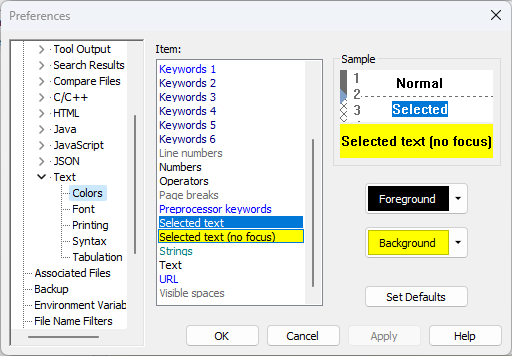
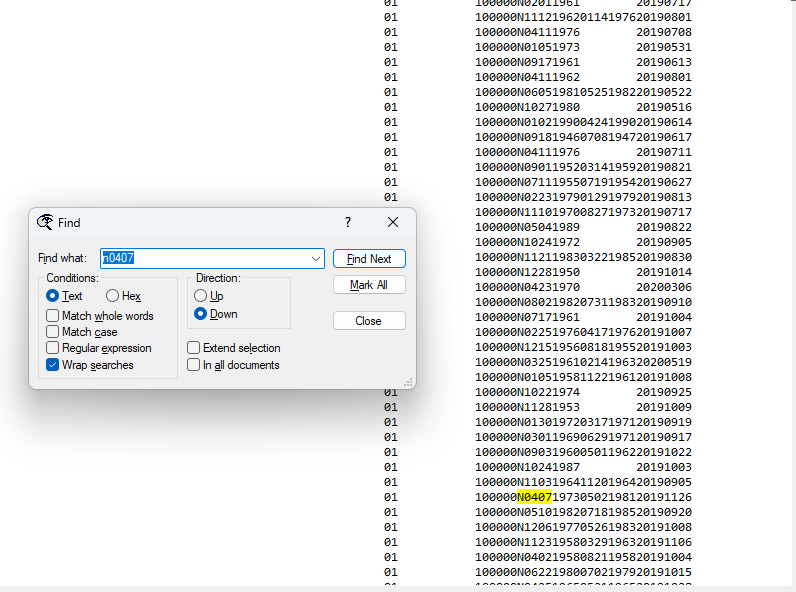
I just registered so I could share the resolution. Preferences > Document Classes > Text > Colors > Selected text (no focus). I modified mine to be a yellow background and it works. When I search, it's highlighting as expected:
- 2023-08-29 11_19_47-Preferences.png (29.16 KiB) Viewed 13602 times
- 2023-08-29 11_25_23-TextPad -.png (71.42 KiB) Viewed 13602 times
Re: Search Results highlighting is invisible
Posted: Sun Sep 03, 2023 1:25 pm
by westdale
Not the only thing that is invisible with colour problems !
Just started with version 9 - after
many years of using TP
- the scroll bar button is very faint and hard to find if working in bright light.
It does highlight on hover and get darker but only if you hover the button itself ( which means you have found it - duhh )
Windows 11 - whose UI is not without faults ! - manages to highlight if you hover anywhere on the toolbar.
This is true for both the blue and white forms (slightly better) of TP
- The title bar does not pick up the windows colouring - so one cannot tell if TP is active quickly without a process of logic that goes -" they are all grey so the TP must be active" . This leads to typing in the wrong window - NOT GOOD.
[ high res screen so my Python dev , application and TP windows are side by side - no one on top ]. Consistency is a good thing.
Re: Search Results highlighting is invisible
Posted: Tue Jul 30, 2024 3:59 pm
by babette
I have tried all variations. Nothing works. Could it be that one has to restart the programme? (Have too many things open for now)