Page 1 of 1
Macros Broken
Posted: Fri May 26, 2023 2:36 pm
by Drxenos
I have several macros set up to comment-out the selected lines in various languages (i.e., C++, Ada, bash, etc.).
They'd worked for years, but with the latest versions of TextPad, they ignore the selection and affect the whole document.
Doing it manually through the replace dialog box still works correctly.
For an example, here is the macro I have setup for bash (and others that use '#' as a line commenter):
Code: Select all
Replace = "^", "#", RegExp, InSelection
DoReplaceAll
I tried recreating the macro, in case the syntax has changed, but it's identical.
Thanks,
DrX
Re: Macros Broken
Posted: Fri May 26, 2023 4:38 pm
by ben_josephs
I was going to post something similar.
Here is a macro to open a line at the current cursor position.
If the cursor is placed before the second "stuff" in the text
Code: Select all
stuff_before_cursor
                    stuff_after_cursor
then running the macro should change the text to
Code: Select all
stuff_before_cursor
stuff_after_cursor
The following macro used to work, but now it obliterates everything except the last line of the document.
Code: Select all
EditDupLine
LineLeftExtend
# SearchReplace
Replace = ".", " ", RegExp, InSelection
DoReplaceAll
CharRight
LineUp
LineEndExtend
EditDelete
Re: Macros Broken
Posted: Fri May 26, 2023 5:26 pm
by Drxenos
Thank you for the confirmation, Ben!
Re: Macros Broken
Posted: Sat May 27, 2023 7:44 pm
by bbadmin
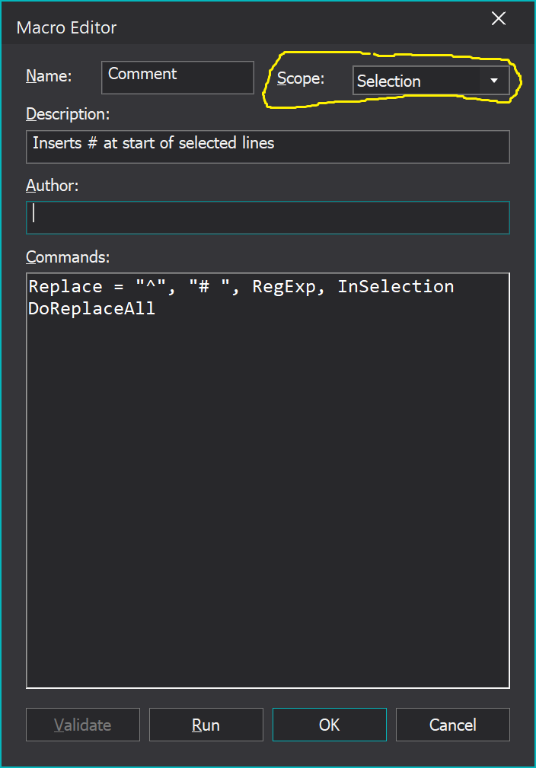
DrXenos' macro will work if its default scope is set to Selection, like this:
- MacroEditor.png (51.82 KiB) Viewed 8738 times
Looking into ben_josephs' one.
Re: Macros Broken
Posted: Sun May 28, 2023 1:33 am
by Drxenos
That worked. Thank you! I've never bothered to set the scope before because "InSelection" seemed to take care of it. I will from now on.
Re: Macros Broken
Posted: Sun May 28, 2023 2:00 pm
by bbadmin
If the scope is set to "Document", any selection is cleared before running the macro. This change was made to allow macros which made their own selection to be repeated with the Multi-play command.
Re: Macros Broken
Posted: Sun May 28, 2023 4:24 pm
by ben_josephs
BTW, I'm using TextPad version 8.16.1.
I changed the scope of my macro to Selection. Then if there is no selection when I run it, it doesn't do anything at all (and no action that can be undone is recorded). And if there is a selection when I run it, it does something that is only vaguely like what it should be doing.
Re: Macros Broken
Posted: Sun May 28, 2023 4:46 pm
by Drxenos
bbadmin wrote: Sun May 28, 2023 2:00 pm
If the scope is set to "Document", any selection is cleared before running the macro. This change was made to allow macros which made their own selection to be repeated with the Multi-play command.
Got it. Thank you!
Re: Macros Broken
Posted: Sun May 28, 2023 7:31 pm
by bbadmin
ben_josephs, please check your PMs.