Page 1 of 2
8.0.2 How to get Tool Output to show Unicode?
Posted: Wed Nov 02, 2016 11:05 pm
by chrisjj
How can I get Tool Output to show Unicode characters?
Currently it shows unicodes as multi-char gibberish e.g.

and obstructs search:

and no solution is found in the preferences here

Non-output windows using the same font show the characters fine:

Posted: Thu Nov 03, 2016 8:37 am
by AmigoJack
What do I have to do to even reconstruct your situation? How can I get any tool output at all? Maybe the source is the problem, not the output. Maybe the font being used is not capable to show the correct characters.
Posted: Thu Nov 03, 2016 12:50 pm
by chrisjj
AmigoJack wrote:What do I have to do to even reconstruct your situation?
Run any tools that output unicode.
AmigoJack wrote:Maybe the source is the problem, not the output. Maybe the font being used is not capable to show the correct characters.
The source in the same font shows the characters. Evidence added to post.
Posted: Thu Nov 03, 2016 1:50 pm
by AmigoJack
chrisjj wrote:Run any tools that output unicode.
So far I can't reproduce it:
- using CMD (what most people still call "DOS") with UTF-16 works fine:
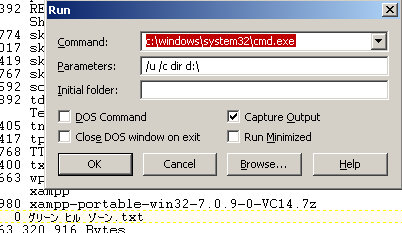
- using PHP with UTF-8 works fine:
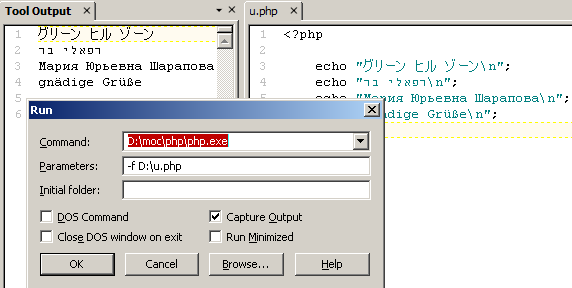
That's why I ask for a reconstructable example, not a loose description on where you think it fits anything. So when you say "run any" you're wrong. Come up with the situation you encountered. The exact one.
Posted: Thu Nov 03, 2016 2:13 pm
by chrisjj
AmigoJack wrote:That's why I ask for a reconstructable example
None was needed to answer the question: "How can I get Tool Output to show Unicode characters?"
As your useful answer demonstrates.
AmigoJack wrote:chrisjj wrote:Run any tools that output unicode.
So far I can't reproduce it:
- using CMD (what most people still call "DOS") with UTF-16 works fine:
Thanks. I'll try that here.
Posted: Thu Nov 03, 2016 2:43 pm
by AmigoJack
chrisjj wrote:None was needed to answer the question: "How can I get Tool Output to show Unicode characters?"
And how should anyone have known you wanted to use the command prompt? Even now it's not sure if you need it, or if you're executing a program on its own. Those are all
different things.
Posted: Thu Nov 03, 2016 3:31 pm
by chrisjj
AmigoJack wrote:And how should anyone have known you wanted to use the command prompt?
To my knowledge TextPad does not offer a command prompt. Do you mean the Run command?
AmigoJack wrote:Even now it's not sure if you need it, or if you're executing a program on its own. Those are all different things.
Different as far as getting Tool Output to show Unicode?? Wow. That had never occurred to me. Thanks for the warning. I'll stick with the Run command for now.
chrisjj wrote:Thanks. I'll try that here.
Following your example of a php.exe in Run, I still get the fail:

Attempting "> out.txt" on Run had no effect, but using a Tool shows the same output via file and regular window succeeds:

I wonder if yours is not a reconstructable example. E.g. depends on PHP version or script, neither of which you've declared.
Posted: Thu Nov 03, 2016 4:50 pm
by AmigoJack
chrisjj wrote:TextPad does not offer a command prompt. Do you mean the Run command?
By "command prompt" I mean the only one existing in the system, not
Textpad. This resembles to CMD.EXE on nowadays
Windows version. In
Textpad's "Run" dialog or "Tools > Add" menu this is the (wrongly titled) "DOS command" checkbox/item. In your "Run" screenshot you haven't ticked it, but in your "Tools" configuration I see you must have chosen "DOS command" previously, as you can't change "CMD.EXE" as command.
That's knowledge outside of
Textpad: either you are in the command prompt already, where you want to issue a command like
DIR, or you want to start an EXE file (which can be the command prompt as well). How
Textpad starts CMD.EXE on its own when you use the "DOS command" option is yet unknown to both of us, so the better approach is to do it on your own. Which also makes Unicode support available.
Why would you encode a text that is already encoded in the PHP file itself? Do you see in my file I call that function, or do you see the characters directly?
Long story short:
- Your PHP should contain only this:
Code: Select all
<?php
  echo 'Tus labios me dirán';
- Save the file with the encoding UTF-8 and no Unicode BOM. That's how my files were saved/encoded.
- Run again thru PHP.EXE directly.
Posted: Thu Nov 03, 2016 6:55 pm
by chrisjj
AmigoJack wrote:chrisjj wrote:TextPad does not offer a command prompt. Do you mean the Run command?
By "command prompt" I mean the only one existing in the system, not
Textpad. This resembles to CMD.EXE on nowadays
Windows version. In
Textpad's "Run" dialog or "Tools > Add" menu this is the (wrongly titled) "DOS command" checkbox/item.
Ah, you mean the command interpreter. Yes my original example used the command interpreter - via TextPad's
Tools,
DOS command option. For avoidance of doubt I'm not using a command prompt.
AmigoJack wrote:How Textpad starts CMD.EXE on its own when you use the "DOS command" option is yet unknown to both of us, so the better approach is to do it on your own. Which also makes Unicode support available.
I don't know what you mean by "do it on my own". If you mean using TextPad Run, well, there's been no evidence in this thread indicating Run and Tool differ in Unicode availability.
AmigoJack wrote:Why would you encode a text that is already encoded in the PHP file itself?
The text is not already encoded as UTF-8. It is encoded as ANSI. So I used run-time encoding to get test output that is UTF-8.
chrisjj wrote:Long story short:
- Your PHP should contain only this:
Code: Select all
<?php
  echo 'Tus labios me dirán';
- Save the file with the encoding UTF-8 and no Unicode BOM. That's how my files were saved/encoded.
- Run again thru PHP.EXE directly.
Thanks. For me that fails:


Does it work for you?
Posted: Fri Nov 04, 2016 8:13 am
by AmigoJack
I get the same results as you. And if I modify the code to:
Code: Select all
<?php
  echo 'グリ';
  echo 'Tus labios me dirán';
then the output is the correct one.
The output is - in any case - UTF-8.
á is UTF-8 for
á (you see that yourself when you compare the binary view of your UTF-8 saved file with the tool output). That means: save your tool output in a file with
ANSI encoding, then open the file again by specifying
UTF-8 as encoding (instead of
Default). Now you should see what you always expected.
If you run the code from above (with the two Katakanas) then the tool output "magically" recognizes UTF-8 and displays it accordingly.
I can only assume that
á alone is not enough for
Textpad to think the encoding is meant to be UTF-8 - it just thinks it's ANSI. But my two additional Katakanas are enough as an indication to UTF-8. But we can trick
Textpad into recognizing UTF-8 right off the start without displaying characters. Use this PHP file:
Code: Select all
<?php
  echo "\xEF\xBB\xBF";  // UTF-8 BOM
  echo 'Tus labios me dirán';
Now this finally produces
Tus labios me dirán to me as well.
I guess the "tool output" document behaves just as any other document as well: it tries to guess the encoding, and can fail to do so.
Textpad could have an option for every tool run where you can choose a specific encoding of the output (or leave it to "automatic"), so the tab displaying the output knows the correct encoding (just like you can choose the encoding when opening a file).
Posted: Fri Nov 04, 2016 4:14 pm
by chrisjj
AmigoJack wrote:That means: save your tool output in a file with ANSI encoding, then open the file again by specifying UTF-8 as encoding (instead of Default). Now you should see what you always expected.
No, that's not what I always expected. What I expected was correct display in the
Tool Output window.
AmigoJack wrote:I can only assume that á alone is not enough for Textpad to think the encoding is meant to be UTF-8
It is not alone. See the setting I already posted:

That should be more than enough.
AmigoJack wrote: - it just thinks it's ANSI. But my two additional Katakanas are enough as an indication to UTF-8. But we can trick Textpad into recognizing UTF-8 right off the start without displaying characters. Use this PHP file:
OK, so
my options to get correct display of the valid UTF-8 sent to Tool Output include:
1 Changing my program to mix some Japanese in with my output Spanish
2 Changing my program to add bytes to the output that are not recommended by the Unicode Standard and are illegal in some major applications e.g.
https://tools.ietf.org/html/rfc7159#section-8.1
3 Save and reopen the output in an editor window, manually changing the encoding.
And my options do not include setting Tool Output default encoding to UTF-8
http://i.imgur.com/4UyFdFs.png
Thanks for your help.
Posted: Fri Nov 04, 2016 4:50 pm
by AmigoJack
chrisjj wrote:my options do not include setting Tool Output default encoding to UTF-8
Yes. Looks like you found a bug from the very start, and I didn't stripped down starting my attempts to accents only.
The Document Class setting seems to have no effect at all. Maybe it even has no effect with any Document Class? If I set it to UTF-8 for
Java files and save the text
dirán in
v.java, close the file, then open it again the text will be interpreted as ANSI, not UTF-8, despite being a
.java file to which the Document Class settings should apply. I'll create a separate topic for this.
At least now I'm more confident in what to do and what to expect from 8.0.2.

Posted: Thu Nov 10, 2016 12:30 am
by chrisjj
chrisjj wrote:OK, so
my options to get correct display of the valid UTF-8 sent to Tool Output include:
[...]
2 Changing my program to add bytes to the output that are not recommended by the Unicode Standard and are illegal in some major applications e.g.
https://tools.ietf.org/html/rfc7159#section-8.1
This fails in a Tool:
http://forums.textpad.com/viewtopic.php?t=13016
Posted: Sun Nov 13, 2016 9:30 am
by bbadmin
In TextPad 8.1, the default encoding for the Tool Output document class is used when capturing the output of external programs. Note that this setting is ignored for DOS commands, because they always output in the DOS/OEM codepage.
Posted: Sun Nov 13, 2016 10:18 pm
by chrisjj


