Page 1 of 1
8.0.02 How to avoid selection losing syntax colouring?
Posted: Tue Nov 01, 2016 11:37 pm
by chrisjj
Anyone know how to prevent selecting text losing the syntax highlighting e.g. unselected:

(coloured text)
Selected:

(All white text)
This is with default syntax highlighting

and affects all file types that I have tried.
Posted: Thu Nov 03, 2016 8:45 am
by AmigoJack
I never expect a selection to show syntax highlighting, as the selection itself is already using its own colors.
Textpad could only safely achieve this by not using specific highlighting colours, but instead always showing the negative colors (of both text and background), so highlighting colors would never collide with other colors and result in making text unreadable.
For the developers:
Notepad++ keeps syntax highlighting, but is not color collision proof either:
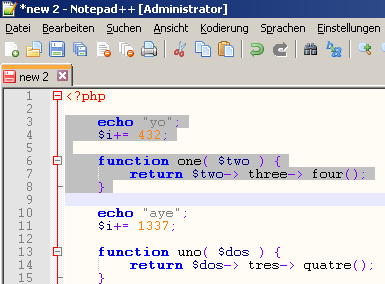
Posted: Thu Nov 03, 2016 1:10 pm
by chrisjj
AmigoJack wrote:I never expect a selection to show syntax highlighting, as the selection itself is already using its own colors.
Not necessarily. The TextPad selection makes it the users choice. This user has not specified a selection foreground coluor, instead specifying automatic. He expected that to yield the colours chosen elsewhere - on syntax.
AmigoJack wrote: Textpad could only safely achieve this by not using specific highlighting colours, but instead always showing the negative colors (of both text and background), so highlighting colors would never collide with other colors and result in making text unreadable.
Not at all. It could show the existing colours unchanged. Just as my chosen non-selected background colour makes those foreground colours safe, so does my chosen selected background colour.
AmigoJack wrote:For the developers:
Notepad++ keeps syntax highlighting, but is not color collision proof either:
I see no colour collision there. What I do see is the kind of result I was expecting from TextPad.
Posted: Thu Nov 03, 2016 1:55 pm
by AmigoJack
chrisjj wrote:It could show the existing colours unchanged.
When one of your syntax text colors is red and your selection text color is maroon you'll see what I mean by color collision. A more drastic example would be a black selection background encountering black syntax highlighting text.
chrisjj wrote:I see no colour collision there.
I never said there is one. I said
Notepad++'s approach is not collision proof - that means: you have to pay attention on which colors you choose here and there and none of them are too similar. Using selection colors that are always the negation of the (normal) display colors would never hit that problem.
Posted: Thu Nov 03, 2016 2:20 pm
by chrisjj
AmigoJack wrote:chrisjj wrote:It could show the existing colours unchanged.
When one of your syntax text colors is red and your selection text color is maroon
Well that would be a silly choice, wouldn't it.
And anyway, as I said, my colours are the defaults.
AmigoJack wrote:chrisjj wrote:I see no colour collision there.
I never said there is one. I said
Notepad++'s approach is not collision proof
Thanks for the clarification.
I'm not asking for collision-proofing. I'm just asking for preservation of (non-colliding, default) syntax colours.
AmigoJack wrote: - that means: you have to pay attention on which colors you choose here
I'd love to know where I need to pay attention to solve the actual problem about which I am asking.
Posted: Thu Nov 03, 2016 2:41 pm
by AmigoJack
You can't solve it.

It's a feature request what are describing here.
Posted: Fri Nov 04, 2016 6:34 pm
by chrisjj
AmigoJack wrote:It's a feature request what are describing here.
Really?? What makes you think this behaviour isn't just a bug?
Posted: Fri Nov 04, 2016 9:34 pm
by AmigoJack
Because I see it the same way: either syntax highlighting or text selection, not both at the same time. A bug is something that is not working as intended, and syntax highlighting in your text selection was never intended.
Posted: Fri Nov 04, 2016 10:22 pm
by chrisjj
AmigoJack wrote:A bug is something that is not working as intended, and syntax highlighting in your text selection was never intended.
I wonder what makes you think it was never intended.
I see nothing on the UI indicating e.g. my keyword colour is supposed to disappear when the keyword is selected.
If that was the intent, then what could have been the intent of the Foreground Colour: Automatic option which is present and currently totally redundant.
Posted: Sat Nov 05, 2016 3:46 pm
by AmigoJack
- Keywords #1 are displayed with blue background and white text,
- Keywords #2 are displayed with white background and black text.
- If your selection background is black and the text color wouldn't change (speak: syntax highlighting would still apply), you'd have a problem with keywords #2 and their black text on the selection's black background.
That's why I think it's intended for the selection to have its own state.